The cockpit for every coding agent you already pay for.
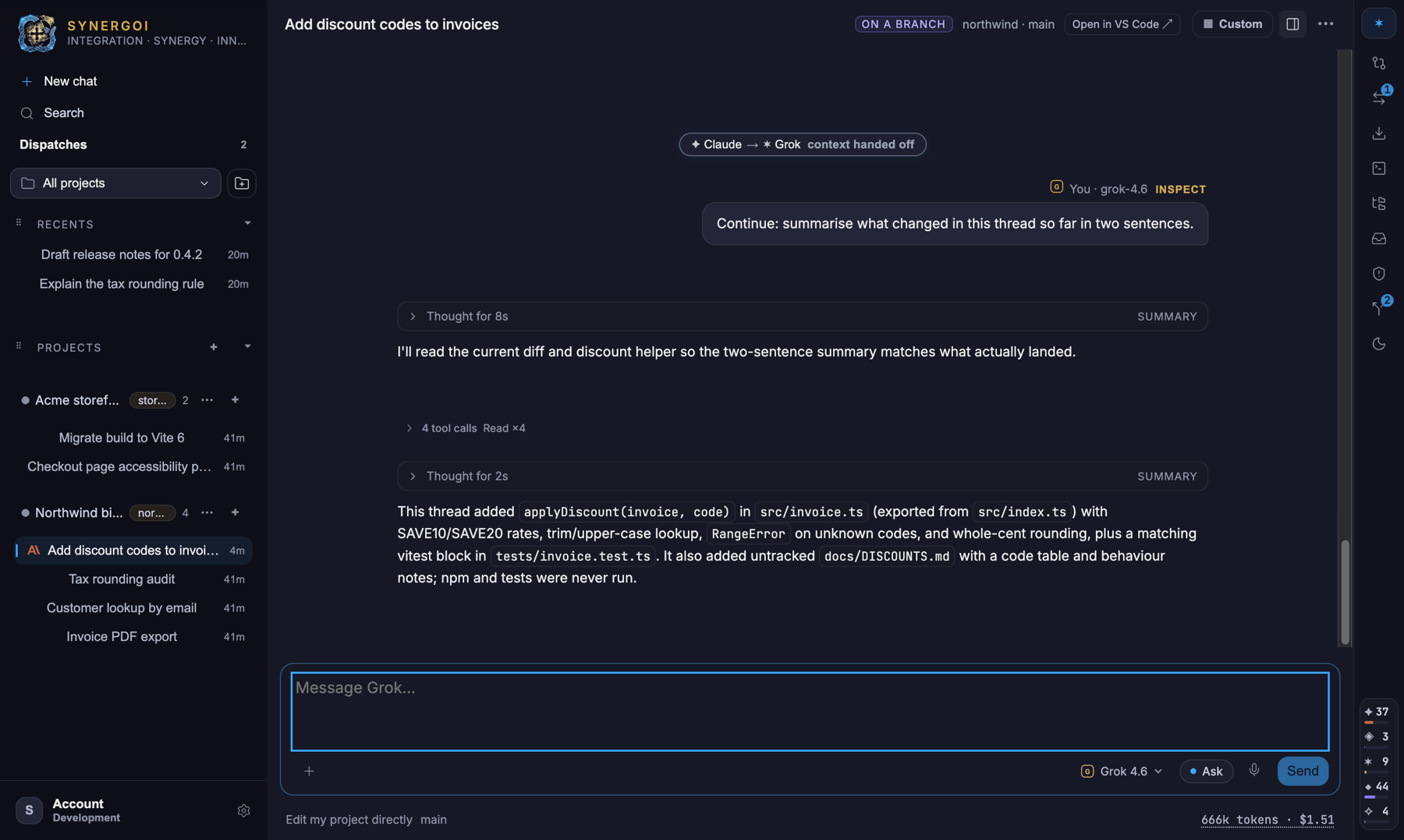
One thread for Claude Code, Codex, Grok, Cursor and Antigravity, on the subscriptions you already have. When one model hits its limit, the next picks up the same conversation. On your Mac and on your PC.
$20/month or $149/year · 7-day free trial · no credits, no markup — your logins, your quotas
Mac · v0.0.22 · Apple Silicon · signed & notarized · ~237 MB
Windows · v0.0.22 · x64 · unsigned installer · ~239 MB
The Windows installer isn't code-signed yet, so SmartScreen will say "Windows protected your PC". Choose More info → Run anyway. It installs into your own account and needs no administrator rights.
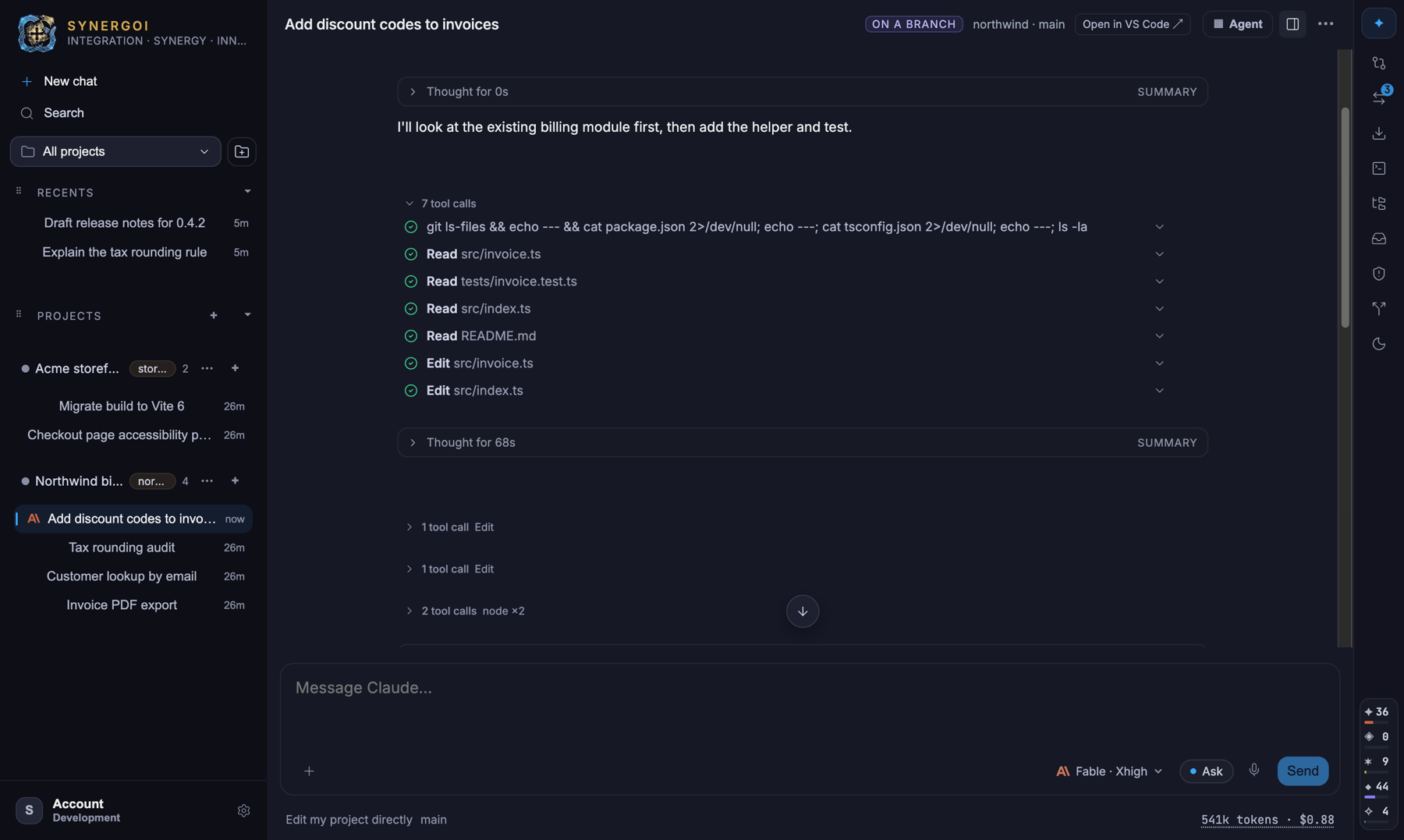
Claude Code on a thread branch — reads, edits, a 68-second think, and five provider meters in the rail.
Works with the agents you already run
Three steps. No new accounts.
The app is a cockpit, not a middleman. Model usage stays on the subscriptions you already pay for; Synergoi adds the seat, the controls and the safety rails.
Connect the logins you have
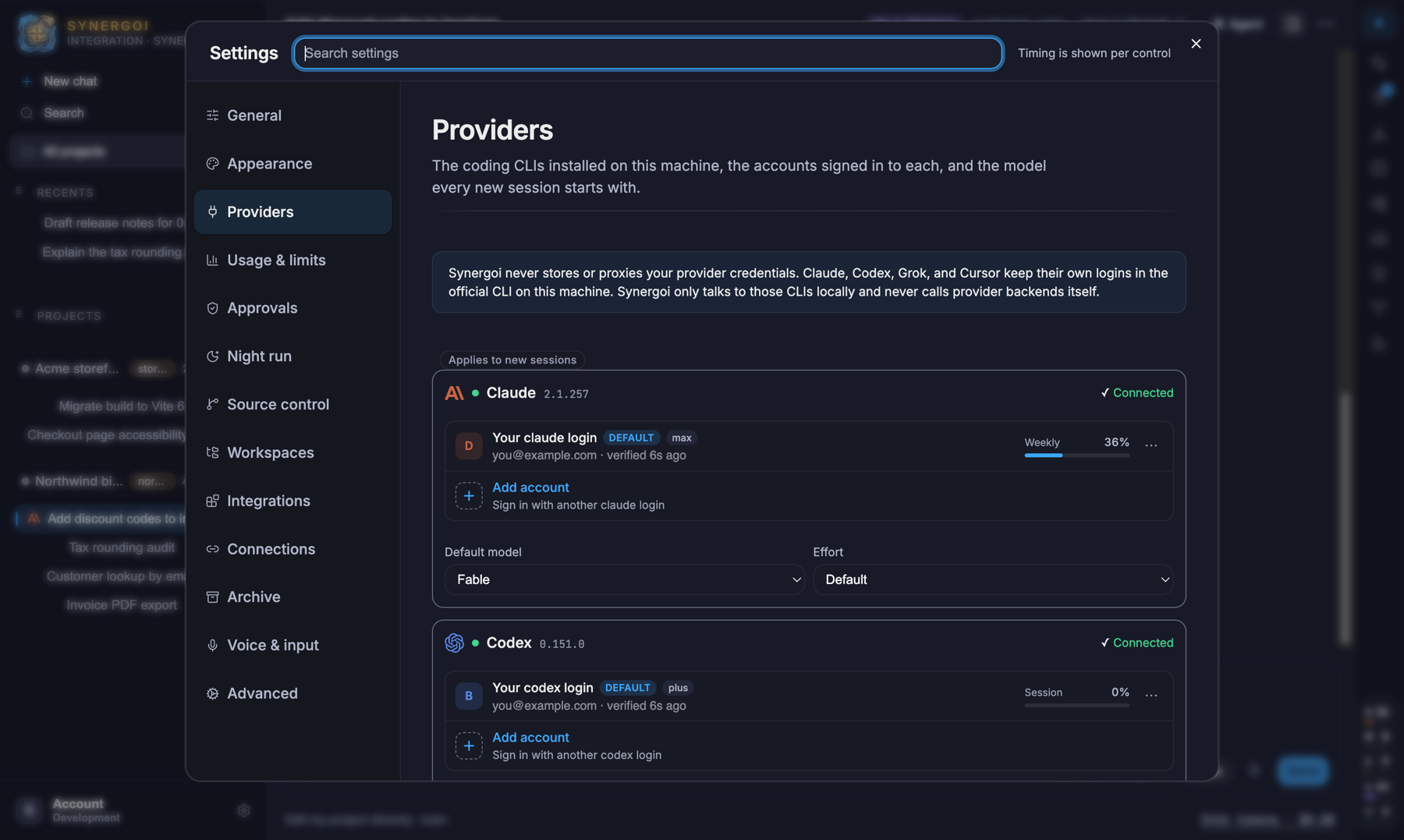
Synergoi finds the Claude Code, Codex, Grok, Cursor and Antigravity CLIs already on your Mac or PC and adopts their sign-ins. No API keys, no credit packs, no new bill for tokens.
Work in one thread, any model
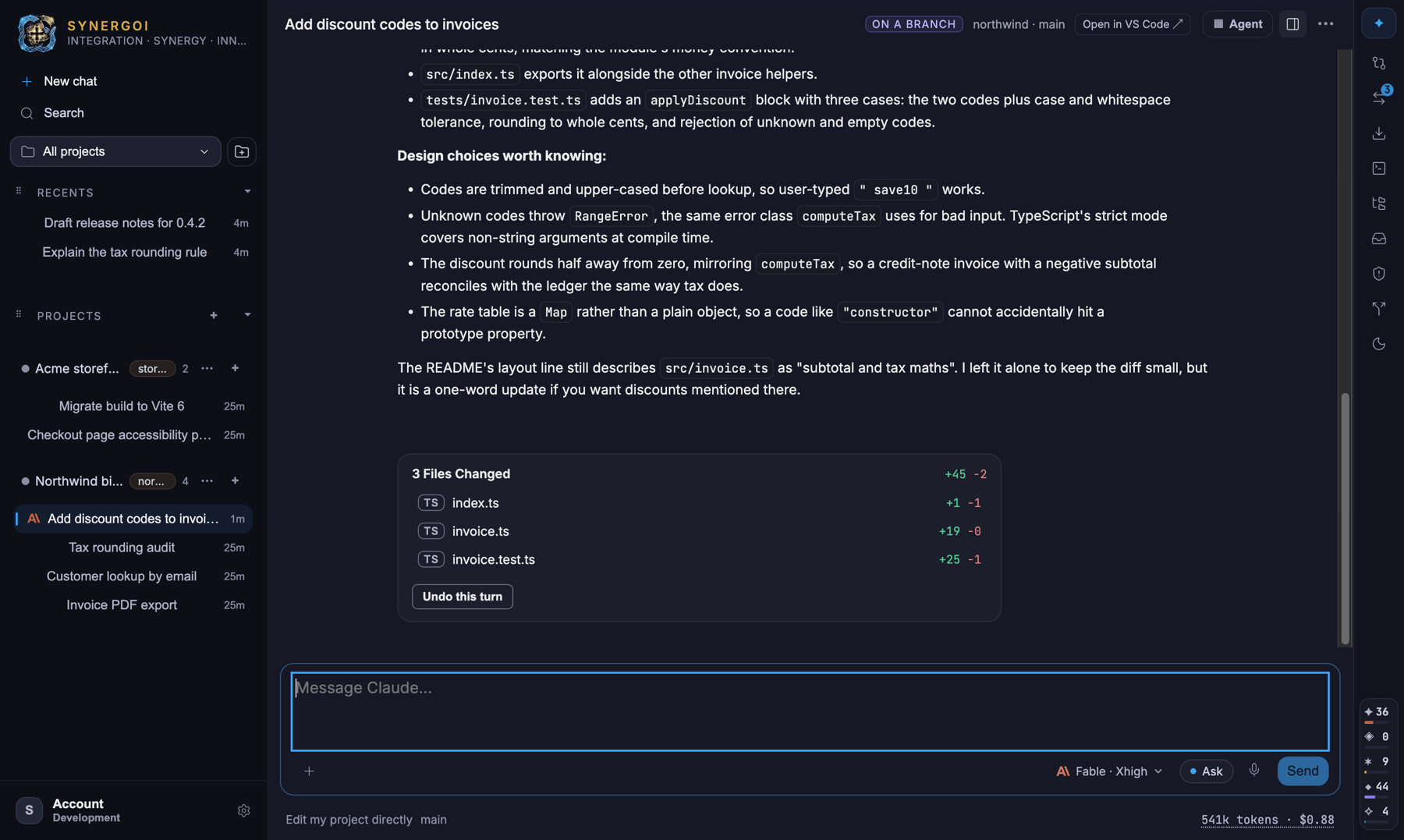
Every thread gets its own git worktree and a checkpoint per turn. Switch models mid-conversation, dispatch a second agent, race two on the same prompt, or ask one a side question.
Approve, review, ship
One approvals broker for all providers. Review the live diff, stage by hunk, commit, push and open the PR — or Land straight onto main with a 24-hour undo.
A folder of PDFs is a project too.
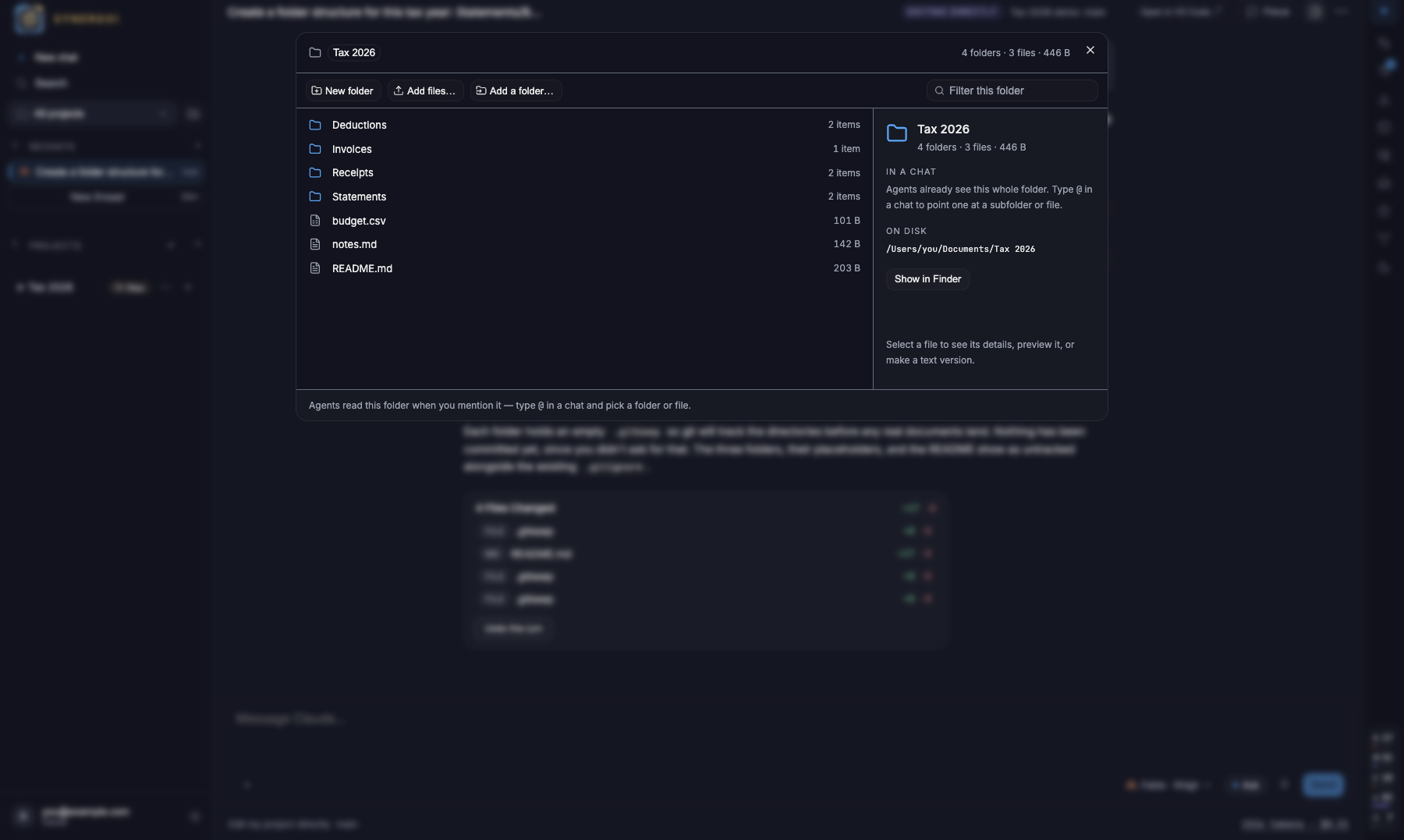
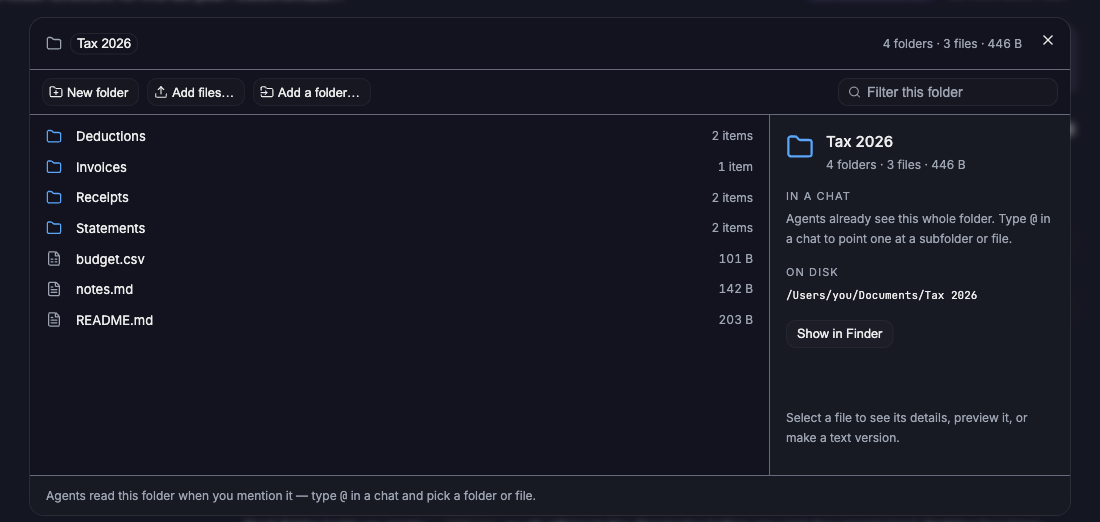
Make a project out of a tax year, a thesis or a client folder. Synergoi gives it a real folder manager, makes text versions of every PDF and spreadsheet so agents can actually read them, and lets you point an agent at any subfolder with @. What an agent builds lands in the folder you see.
- Add project › Files & documents: a new folder or one you already have, nothing copied
- Browse, new folder, move, rename, drop files in, preview, reveal in Finder
- One .txt per PDF and one .csv per sheet, made in the background
- @Invoices/2026/ in a chat hands the agent a path — and every turn knows where the text versions are
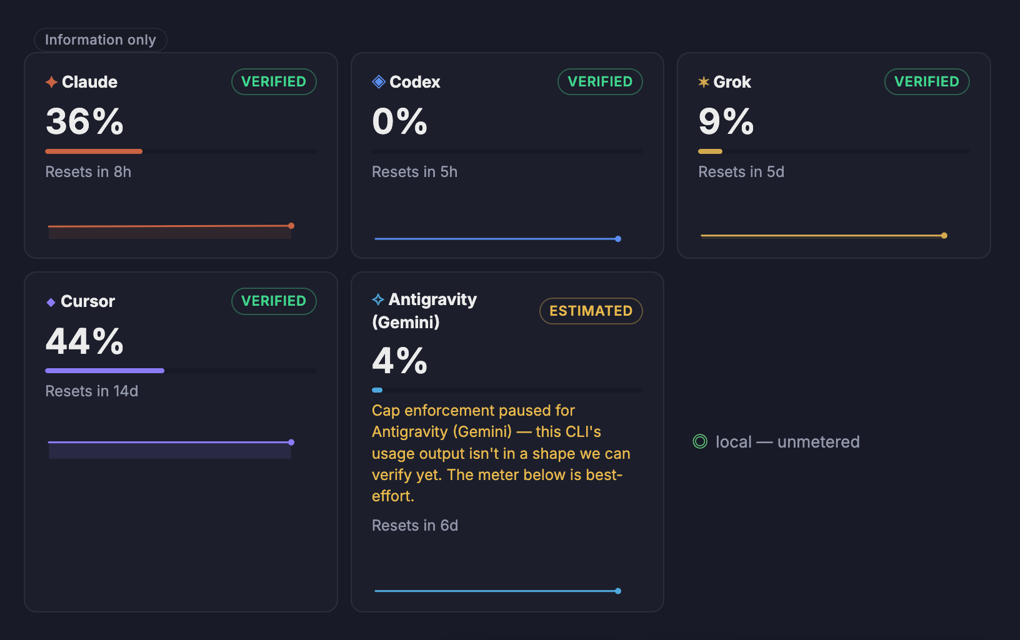
Real meters. Real caps. A hand-off when it matters.
Synergoi reads the same usage windows the official CLIs report — Claude's 5-hour and weekly windows, Codex rate limits, Grok, Cursor, Antigravity — and shows them in the rail. Set your own caps, let the watchdog stop runaway turns, and choose what happens at the limit.
- Meters come from each provider's own probe, with a confidence badge when they don't
- Caps per provider and per window, strict or soft, plus a turn watchdog
- Failover to the next account or model with a Context Pack — the original ask, what changed, what was decided, what's left
- A usage ledger with what your work would have cost at API prices
One conversation. Every model. Its own worktree.
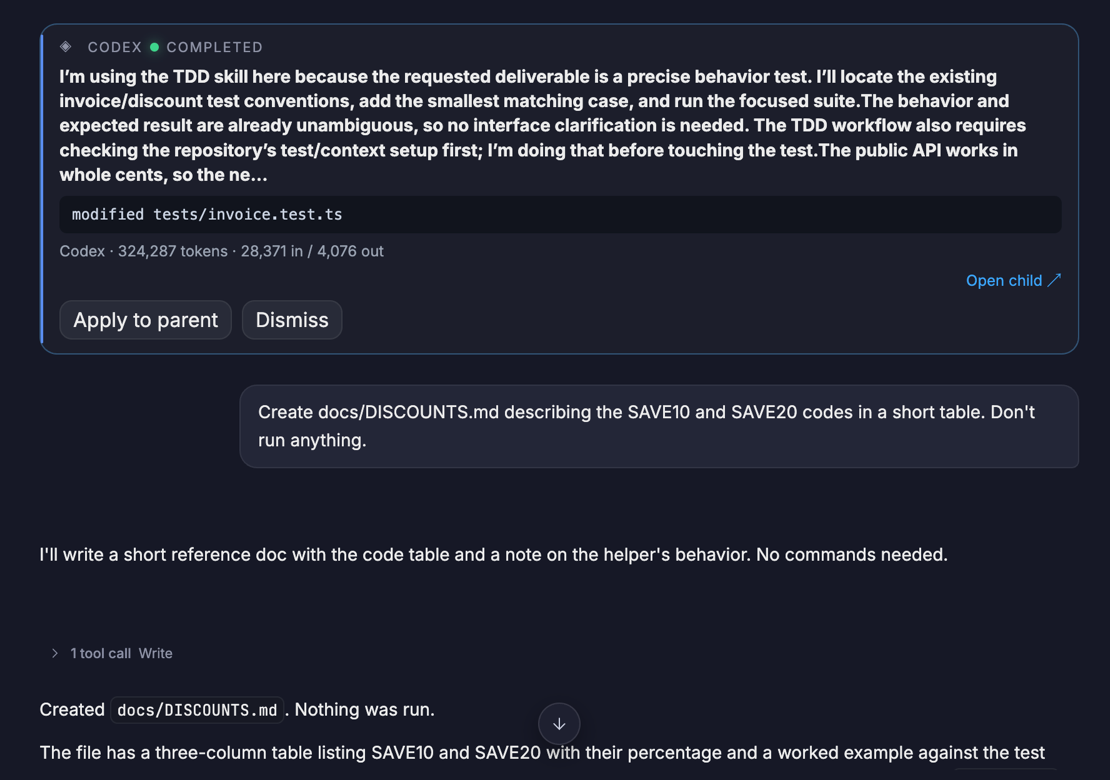
Each thread checks out its own git worktree and saves a checkpoint after every turn, so agents can work in parallel without stepping on each other — and you can undo any turn. Dispatch a task to Codex while Claude keeps going, race two models on the same prompt, or @mention one for a read-only opinion.
- Dispatch: a second agent builds in a sibling worktree; Apply to parent is a real merge, undoable
- Panel: two or three models answer the same prompt; pick the winner
- @mention side-asks and /btw questions that never touch your files
- Switch provider mid-thread — the next model gets a Context Pack, not a blank slate
One approvals broker. Then commit, push, PR — or Land.
Every provider's tool calls go through the same broker with four access presets, from Read-only to a per-project Full auto that still stops for destructive git. Review the live diff as it grows, stage by hunk, write the commit, push, open the PR. Or hand the list to Night Shift and read the brief in the morning.
- Read-only · Ask · Workspace auto · Full auto — the same rules for every model
- Approvals cockpit (⇧⌘A) with an attention inbox, tray and menu-bar island
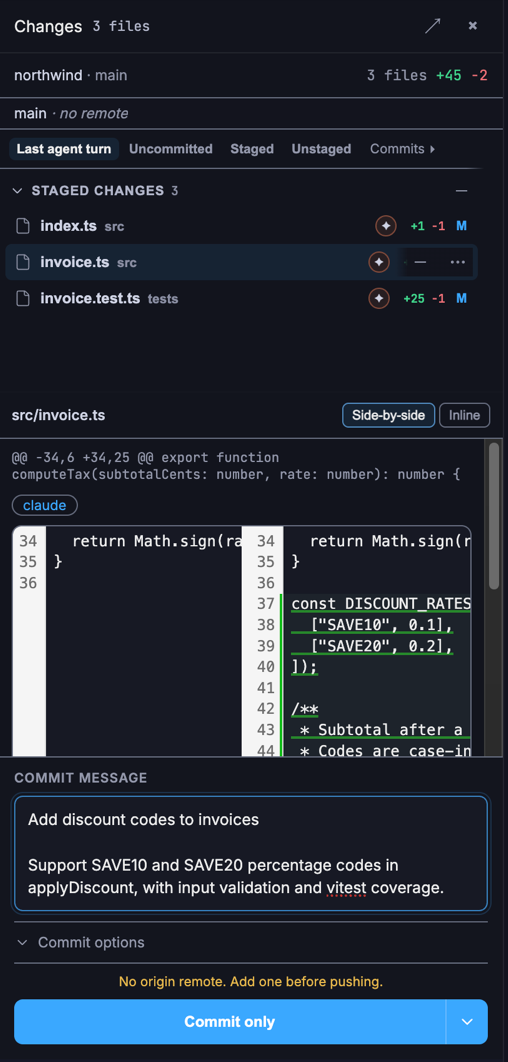
- Changes dock: side-by-side or inline, per-hunk staging, drafted commit messages
- Land onto main with a merge preview, checks, and a 24-hour undo
Hand over the list. Go to bed.
Night Shift used to live in a settings form. Now it starts where the work already is — the composer. Describe what done looks like, name the crew, and press start. Each slice builds in its own worktree, gets reviewed and checked, and the lead leaves a brief with what shipped, what didn't, and what needs you.
How Night Shift works- Press the moon in the composer, write the goal, @mention who plans, who builds and who checks
- Cmd/Ctrl+Enter starts it. Enter is still a newline — nothing launches by accident
- Mixing vendors is the point: a Claude lead, Codex builders, a Grok reviewer, so no single quota carries the night
- Say up front where it lands — merged into main, or left on its branch for you to read first
- Run cards live in the conversation with their own clocks; the shift keeps twenty minutes back to finish and write the brief
A shift never widens its own permissions. If a slice needs something your access preset forbids it waits for you; if it runs out of clock, the work is parked intact and said so in the brief.
Built for the way agents actually get used.
Every feature below ships in the current build. No roadmap tiles, no waitlists.
Connected apps · Preview
The ticket and the doc, in the conversation.
Sign in through the service's own browser page — no developer app, API key or MCP JSON to assemble. Then pick, per account, exactly which actions your agents may take. Reads start on, writes start off, and a write asks for your approval every time, even under Full auto.
Linear
Search issues and projects, list teams, read an issue — and create one when you approve it.
Google Drive
Pick the files an agent may use, read text, export a Doc as text or a Sheet as CSV, write a text file back.
Microsoft 365
Search and read plain-text mail, look up a date range in your calendar, send a mail or add an event on approval.
Content you ask for is a tool result: it may be saved in your local chat history and sent to the AI provider you selected, through its official CLI. Tokens are encrypted in local app data with a key the OS protects, and are never put in a prompt, a tool argument or an agent's environment.
One price. Your quotas.
Beta is open. Starting at $20 a month — no credits, no per-token markup, no API keys to buy. Synergoi drives the subscriptions you already have. Try everything free for 7 days.
Billed $149 once a year — $91 less than twelve months of monthly.
Start 7-day free trialCard via Lemon Squeezy. Cancel from your receipt email before day 7 and pay nothing.
Prefer to download first? Mac or Windows — it asks for a key once you decide.
Everything included
- Mac and Windows, both auto-updating, one licence across your own installs
- Claude Code, Codex, Grok, Cursor Agent and Antigravity — through your own logins
- Local models via the bundled OpenCode harness (Ollama, LM Studio, llama.cpp)
- Quota meters, caps, watchdog and failover with Context Pack handoffs
- A context meter per provider, and Compact where the provider advertises it
- Dispatch, Panel and side-asks across models, each in its own worktree
- One approvals broker with four access presets for every provider
- Changes, Ship, Land with undo, and Night Shift with a morning brief
- Connected apps: Linear, Google Drive and Microsoft 365 (preview) — writes always ask
- MCP hub, agent terminals, push-to-talk voice, transcript search
- Launch the desktop tools you work alongside from the ⌘K palette
- Files & documents projects: a folder manager, text versions of PDFs and spreadsheets, @folder references
- Every update while you subscribe. License keys cover your own installs.
Model usage is billed by Anthropic, OpenAI, xAI, Cursor or Google on your existing plans — never by us. Questions? License docs or [email protected].
Straight answers, no fine print.
If yours isn't here, email support and a human replies.
Do I need API keys or credits?
No. Synergoi talks to the official command-line agents you already installed — Claude Code, Codex, Grok, Cursor Agent, Antigravity — using the logins they already have. Model usage is billed by your provider exactly as it is today. Synergoi never proxies or marks up a token.
What does the subscription actually pay for?
The cockpit: the worktree-per-thread model, quota meters and failover, Context Pack handoffs between models, dispatch and panel trials, the approvals broker, Changes/Ship/Land, Night Shift, connected apps, the MCP hub, voice, search and every update we ship, on both Mac and Windows.
Which providers are supported?
Claude Code (Pro or Max), Codex (ChatGPT Plus/Pro), Grok (SuperGrok), Cursor Agent, Antigravity (Gemini) and local models through the bundled OpenCode harness. Each connects with the vendor's own login flow — AI authentication stays with the official CLI. Optional connected-app tokens are encrypted in local app data.
Which platforms?
Both. macOS on Apple Silicon is signed and notarized. Windows 10/11 on x64 installs into your own account with no administrator rights — the installer is not code-signed yet, so SmartScreen warns on the first run (More info → Run anyway). Both platforms auto-update. Intel Macs and Windows on ARM are not supported.
How does the free trial work?
Pick monthly or yearly at checkout and you get 7 days free. Your license key arrives by email within a minute; paste it into the app once. Cancel inside the trial and you pay nothing.
Where does my code and conversation go?
Transcripts and Context Packs are stored locally. Cloud AI providers receive the prompts and content you use with them, including requested connected-app results. Optional Drive, Microsoft and Linear connections call those services directly; their tokens are encrypted locally. The paired iPhone can receive encrypted chat content. Our Privacy Policy explains storage, sharing and deletion.
Can I use it on more than one computer?
Yes. A license key activates a limited number of installs; when you retire a machine, Settings › General has a one-click "Deactivate this machine" that frees the slot.
What happens if I stop paying?
The app keeps a 72-hour grace period after a failed validation, then locks agent work. You can still open, read, search, export and delete everything — locked never means lost.
Across 870 files in the engine, UI and shell packages, run in isolation before every merge.
Every load-bearing choice — brokered approvals, the local engine, licensing — is written down.
A fresh bearer token per launch. Nothing is exposed to your network.
Cloud AI, connected apps, updates, licensing and the optional companion use network connections. Our Privacy Policy explains what is shared.
Built in the open with the very agents it drives.
Stop babysitting five terminals.
Download, sign in with the accounts you already have, and run your first thread in under two minutes. 7 days free.
Mac · v0.0.22 · Apple Silicon · signed & notarized · ~237 MB
Windows · v0.0.22 · x64 · unsigned installer · ~239 MB
The Windows installer isn't code-signed yet, so SmartScreen will say "Windows protected your PC". Choose More info → Run anyway. It installs into your own account and needs no administrator rights.